Use a bangs filter before choosing a fringe
A bangs filter is useful when you already like most of your haircut and want to change the part around your forehead. Looking through a full hairstyle library can make that decision harder: a shorter cut, a new part or a different amount of volume may influence your reaction more than the fringe itself. Comparing three fringe shapes on one selfie keeps the question small enough to answer.
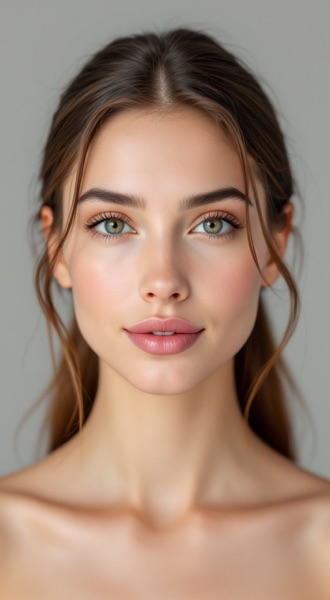
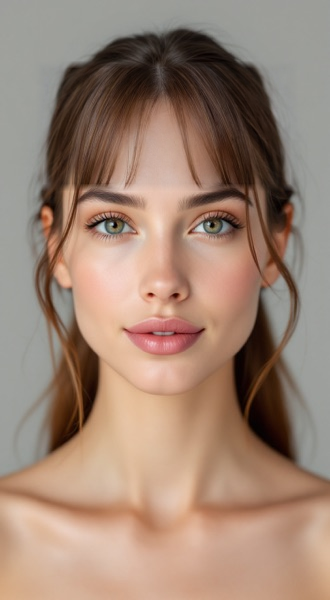
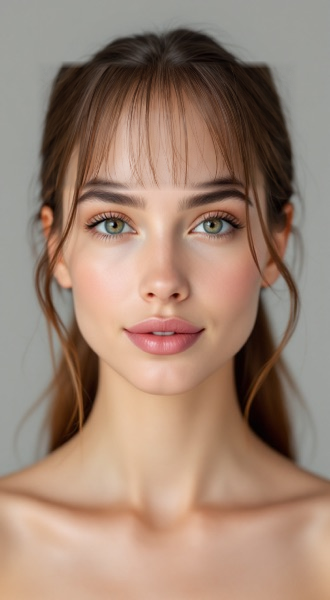
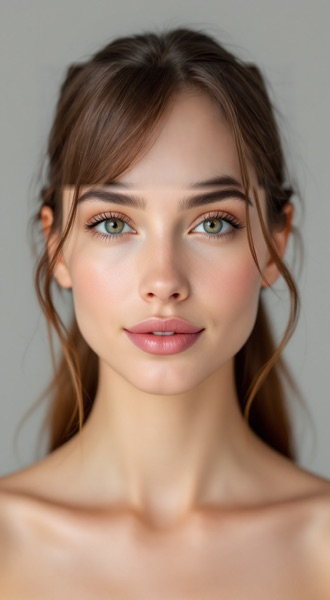
The example above uses one synthetic adult model. It shows curtain, wispy and side-swept bangs without changing the rest of the source image. Personal previews use the same reviewed style descriptions and local forehead blend. The demonstration is a way to see what the tool does; it is not evidence that a particular fringe will sit the same way on your hair.
For a broader change, use the hairstyle try-on. That tool can change the whole cut. This page focuses on a fringe, and the two tools share account credits rather than issuing a second free allowance.
Three looks in the bangs filter
Curtain bangs leave an opening around the part and frame the sides of the forehead. Look at how much space remains between the two sections, where they start to turn outward and whether that arrangement feels natural with your usual part. A short curtain preview is different from long face-framing pieces that extend toward the cheekbones.
Wispy bangs spread lighter, separated strands across the front. They leave gaps through which the forehead remains visible. This is also often described as an airy fringe. The comparison helps you judge coverage, but it does not measure your actual hair density or prove that the same separation will last through the day.
Side-swept bangs make a diagonal shape. Pay attention to the direction you already brush your hair and how the fringe meets the side sections. A side-swept bangs filter can help you compare that direction with a middle opening; a stylist still checks whether your roots naturally cooperate with it.
Try to describe what you prefer rather than only choosing a label. “Less coverage in the middle” and “keep it clear of my glasses” give a stylist more information than “the second picture.”
Take a useful comparison selfie
Use even light and face the camera directly. Keep your usual part and surrounding hair visible so the original can provide a fair baseline. Move existing fringe out of the way if it hides the forehead, but avoid pulling all the hair into an unfamiliar shape. The point is to compare the new front section with the haircut you actually wear.
The same on-device checks used by the hairstyle tool check the frame before generation. An angled head, blurred capture or hair hiding important facial landmarks can make the forehead area unreliable. Retake the selfie if the tool rejects it. Passing the check means the photograph is usable for a preview; it does not mean the haircut has been assessed by a professional.
Keep the selfie in the studio while trying each look. Taking a new photo starts a new comparison, because mixing outputs from different head positions would make the side-by-side view misleading.
What stays the same in the preview
The dedicated templates request a fringe change and ask the provider to retain the existing length, silhouette, color and texture elsewhere. The display does more than rely on that wording: it blends only the forehead edit region into the original photograph. Pixels outside that region come from the source, including the lower lengths, clothes and background.
The edge of the blend is softened inside the edit region. This helps join the generated strands to the source without letting the change spread across the photograph. It can still leave an imperfect transition when the model places hair beyond the forehead or moves a strand unexpectedly. Treat an awkward join as an image limitation, not as a forecast of a bad haircut.
The downloadable comparison keeps the original next to the completed previews. AI labels sit beneath the edited pictures, so they do not cover the hair you are comparing.
Read the result with your hair in mind
Compare coverage first, then direction and density. Which look leaves the amount of forehead you want visible? Does a diagonal sweep work with your glasses? Would you rather brush the front into two sections or let lighter strands fall forward?
Then check the limits of a flat image. A bangs filter cannot show how roots lift after washing, how your fringe separates during exercise or how much time a cowlick needs. Texture and shrinkage matter particularly if your hair changes shape between wet and dry. The preview keeps the source color and visible texture; it does not reproduce every behavior of that hair.
Face shape can add context without deciding the cut. The oval-face hairstyle guide and round-face hairstyle guide explain different framing choices. Use them as another reference, alongside your part, texture and routine.
Bring a specific request to the salon
Download the comparison and mark the look you want to discuss. Ask the stylist to translate it into a real starting length, an amount of hair taken into the fringe and a direction that works with your growth pattern. Agree on where the shortest pieces end when your hair is dry.
Also discuss upkeep. A fringe that sits near the eyes may need more frequent trimming, while a longer opening may change shape as it grows. The appropriate schedule depends on the actual cut and your hair. You can ask for a gradual change if you want to learn how a smaller front section behaves first.
If the decision has grown into a complete haircut change, return to what haircut should I get?. The bangs comparison remains a reference for the front section rather than a replacement for the whole consultation.
Updated 2026-10-08